Inside Seezo's Customization Engine: Bringing Your Security Standards into Seezo
|
Educational
Ved Prabhu
Every organization defines “secure” differently. One company’s standard is another’s afterthought. Capturing that nuance is the whole point of customization: a core pillar of how Seezo approaches security design reviews.

Every organization defines “secure” differently. One company’s standard is another’s afterthought. These standards are usually scattered across internal wikis, design guidelines, documentation, and organization-specific terminology
Capturing that nuance is the whole point of customization: a core pillar of how Seezo approaches security design reviews.
Instead of running the same generic rule set against every customer, organizations can bring their own security standards into Seezo, map them against existing coverage, identify gaps, and turn those gaps into organization-specific custom rules that become part of every future review.
The Custom Rules Engine is what makes that possible.
And now, with the new self-service experience, teams can build and manage those rules themselves instead of relying on Seezo’s engineering team.
To understand how that works in practice, we sat down with Ved, Seezo’s founding security engineer, to discuss how security knowledge becomes enforceable rules, what happens behind the scenes, and why Seezo designed the system this way.
Let’s start from the beginning. Why does a security design review need to understand an organization’s own security standards in the first place?
It comes down to relevance. Seezo can give you a strong set of security findings, but every customer has things they specifically care about that we wouldn’t know by default. Those requirements live in their cloud security standards, cryptography standards, internal processes, and so on.
So customization really does two things.
First, it identifies coverage gaps, things the customer expects us to check that Seezo doesn’t cover today. Say their standard requires specific regional or industry governance. That’s not something any security tool would automatically know. So customization makes such org specific security standards part of every security design review.
Second, it makes the remediation specific to how that organization actually works. We might already flag weak encryption, for example. But if their standard says, “Use our internal encryption library,” that’s what the remediation should say, rather than giving the developer generic guidance on how to encrypt something.
Before customization, there can be a gap between what their security team catches and what Seezo finds, because their reviewers have years of internal and tribal knowledge we don’t have.
That’s really the point of customization: taking the security knowledge that already exists inside an organization and making it part of how Seezo reviews their designs.
When a customer gives you hundreds or even thousands of internal standards, how do you turn that into a rule set without simply ingesting everything?
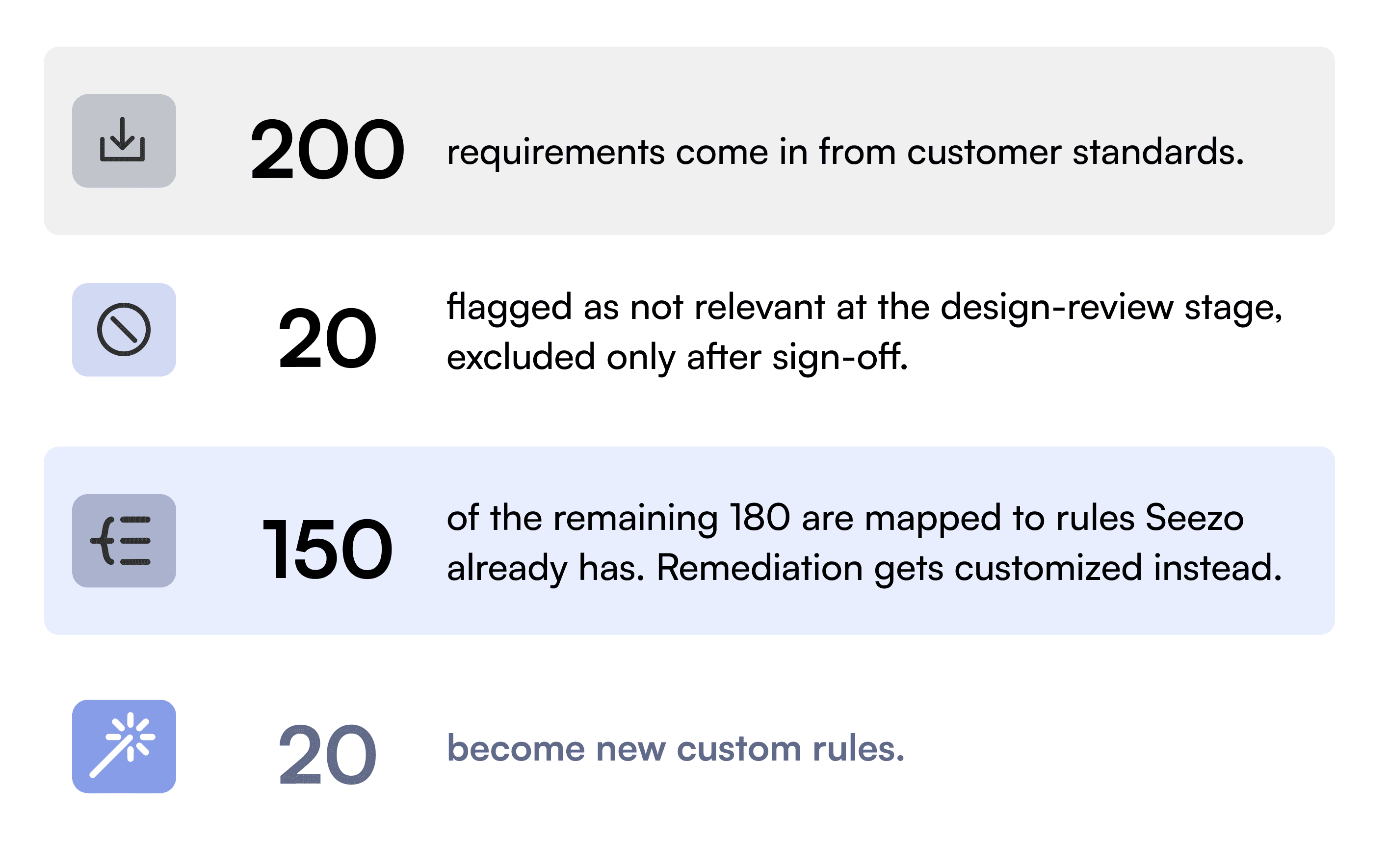
The first thing we do is run pattern detection to figure out how much of the information they have given us is actually relevant at the secure design review stage.
For example, a customer might include endpoint security standards or documentation on how to secure a laptop. Perfectly valid security requirements, but they have nothing to do with reviewing an architecture.
We have patterns in place to identify things like that, flag what we think isn’t relevant, and then go back to the customer for sign-off before excluding anything.
Once we have the relevant set, we map it against what Seezo already covers.
How many rules are we talking about, and what separates a "base" rule from a custom one?
Seezo runs on roughly 1,500-plus rules total, with 500 to 700 typically running on any given scan, depending on what's in scope. Our base rules are built on years of AppSec expertise, combining practical experience, industry best practices, and established security standards They run for every customer, and we fully control them. Custom rules live in a separate tenant, with strict data isolation between customers. What a customer actually sees is a combination: our base rules and customized rules we've built for them, including new rules and custom remediations.
A rule only graduates from custom to base once multiple organizations independently need the same thing. If two fintech customers happen to care about the same control, we don't merge their rules; we keep each one in its own custom tenant. We only promote a custom rule into our base rule set once we see the same requirement coming up consistently across organizations.
Security standards aren’t the only thing that’s unique to an organization. How does Seezo account for the jargon, language, systems, and institutional knowledge that exist only inside a company?
That's where the glossary comes in. Organizations often have their own terminology for internal services, systems, and architecture patterns. A term might mean one thing generally and something completely different inside a particular company. Without that context, the model falls back on its general understanding, which may not reflect what that term means inside the customer's environment.
The glossary lets customers define that vocabulary explicitly. If an internal service called "Kong," for example, handles rate limiting and has a specific role in the architecture, that definition becomes part of the context Seezo uses during a scan.
For every rule, we bring together three things: the architecture document, the customer’s glossary, and the prompt for that specific check. Every evaluation happens with that combined context. In that sense, we’re not just customizing which rules an organization cares about, we’re also giving those rules the information they need to interpret the architecture correctly.
How do you know a new rule actually works before you trust it on a customer’s architecture?
Every prompt goes through evals before it’s trusted. We generate synthetic documents and manually write the ground truth for each one: what the correct yes, no, or no-information answer should be.
Say the ground truth says a rule should return five yeses, but we get three yeses and two nos. That’s when we start digging. Is the prompt the problem? Is there something about how the information is expressed in the document that the rule isn’t picking up? We keep refining and re-evaluating until we’re confident the rule performs consistently.
The other part is how we structure the rules themselves. We don’t create isolated checks that run against every document. They’re built into workflows, almost like a tree. You might start by asking whether authentication is in scope. If it is, you go deeper: is it password-based, token-based, or certificate-based? From there, the workflow continues to narrow the evaluation based on what’s actually relevant.
That structure also gives us traceability. If a rule doesn’t fire when we expect it to, we can go back through the workflow and see exactly which question or node caused it to stop. We’re not looking at a black box and trying to guess what went wrong. Now we have a path we can trace and fix.
More rules can easily mean more noise. How do you keep customization from making that problem worse?
The goal of customization is to make sure the right rules run for the right customer.
During a proof of concept, we actively monitor the output and see why a rule was triggered. Was it triggered for the right reason? What part of the document caused it? The decision tree, decision path, and citations help us trace that back, so if something looks like a false positive, we can understand what actually happened.
Customer feedback is another part of that loop. Sometimes a finding is valid, but the customer already has a mitigation in place that we don’t have visibility into. In those cases, the question becomes: what context are we missing, and how do we bring that into Seezo so we’re not repeatedly surfacing something the customer has already addressed?
Another important lever is the custom assessment profiles. If certain rules aren’t relevant to their environment or they’ve already addressed them elsewhere, those rules don’t need to be part of their assessment profile. They see only what's relevant, which also reduces developer fatigue.
Security standards change over time. How do you make sure the rules built around them don’t quietly become outdated?
We track the standard itself: its validity period, version, and last approver. Standards typically have a shelf life of maybe two or three years, sometimes longer, so we know when one is approaching its end of life.
As that date gets closer, we surface it to the customer, either through an in-app notification or through the customer success team, so their security team knows it’s time to review or renew it. Once they provide the updated standard, we can ingest the new version as well.
Does this look different across industries: healthcare versus fintech versus something newer like blockchain?
The pipeline underneath stays the same. What changes is the thinking that happens before anything enters that pipeline.
Different industries care about different frameworks and requirements. In healthcare, you might be looking at HIPAA or FDA regulations. In fintech, it can vary by geography: RBI in one market, PCI in another. So before we start creating rules, we need to understand what security actually means for that industry at the design review stage.
The effort really depends on how new the space is to us. If it’s an industry we already understand, and a customer brings us new standards, we know what to do and the pipeline can take care of much of the process.
A completely new space is different. We had this with blockchain, where we didn’t already have rules to work from. So the first step was really reconnaissance: understanding what security means for blockchain, what frameworks and requirements matter, and what we should actually be checking for at the design stage. Once we have that understanding, the next customer in that space benefits from the work we’ve already done.
You’ve spent a lot of time building and validating this process internally. What changes now that the Custom Rules Engine is becoming self-service?
Until now, customization has involved our team. A customer gives us their security standards, we figure out what’s relevant to a design review, map those requirements to rules we already have, create what’s missing, and evaluate the new rules before they’re used.
What we’re doing now is bringing that process into the product by making it self-serve. Customers can now bring their own security standards into Seezo and get to a tested, organization-specific rule set much faster, without relying on our team to run the customization process for them.
The mechanics of customization and validation can now happen within the product, while we continue to handle the judgment calls that require human expertise.